
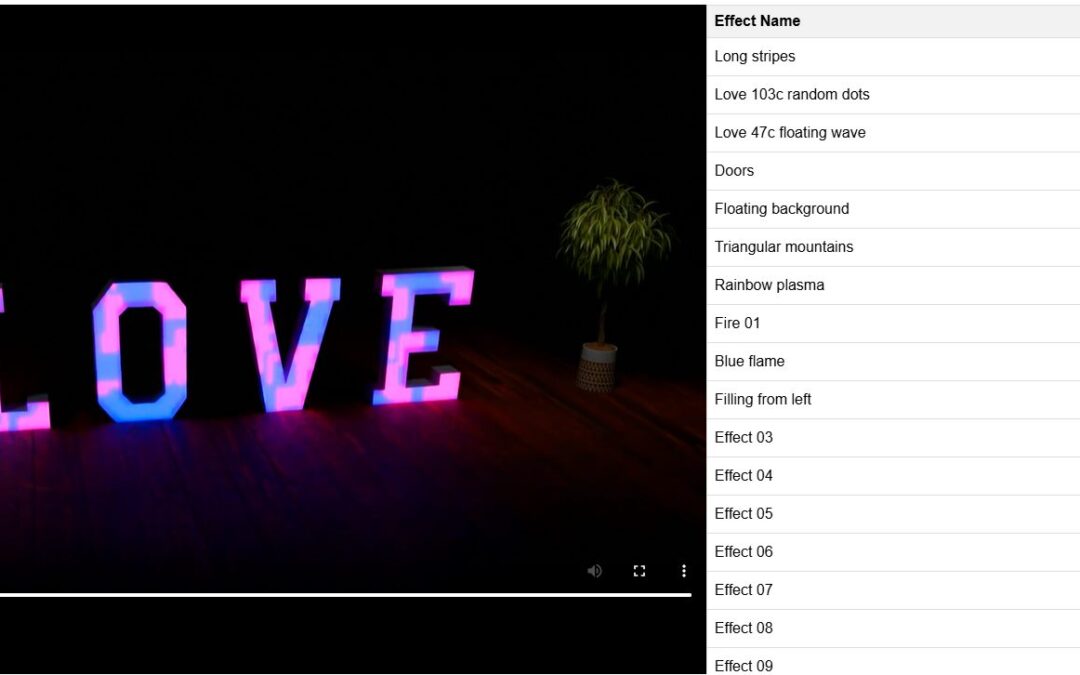
The effects list is embedded with a standard iframe. You do not need to install extra files or update the list manually.
Ready-to-Use Embed Code
Paste the code below where you want the effects list to appear.
<iframe
  src="https://alesterowniki.pl/effects_wave.php?embed=1&lang=en"
  style="width:100%; height:760px; border:0; display:block;"
  loading="lazy"
  allow="autoplay; fullscreen">
</iframe>
The following view should appear on the page:
URL Parameters
| Parameter | Description | Example |
|---|---|---|
embed=1 |
Enables embed mode. The page returns only the embeddable list, without the full page header or footer. | ?embed=1 |
lang |
Sets the list language. Available values are pl and en. |
&lang=en |
Instructions for Popular CMS Platforms
WordPress
- Open the page or post editor.
- Add a Custom HTML block.
- Paste the full
iframecode. - Do not convert this block into a regular visual/text block.
- Save the page and check the preview.
If WordPress shows a message about unexpected or invalid block content, remove that block and add a fresh Custom HTML block.
Drupal
- Create a custom block or add content to a page.
- Select a text format that allows full HTML, such as Full HTML.
- Paste the
iframecode. - Save the block and place it in the appropriate page region.
Wix
- In the editor, choose Add → Embed Code → Embed HTML.
- Paste the
iframecode. - Set the element width to 100% of the available section and adjust the height.
Joomla
- Go to System → Global Configuration and make sure the editor does not remove
iframecode. - Add a Custom module.
- Switch the editor to HTML/code mode.
- Paste the
iframecode and assign the module to the selected position or article.
Shopify
- Open the theme editor.
- Add a Custom Liquid section or a custom-code block.
- Paste the
iframecode. - Save the changes and check the product page or target page.
Squarespace
- Add a Code block.
- Paste the
iframecode. - Disable automatic formatting if that option is available.
- Save and check the page preview.
Adjusting the Display
The most common setting to adjust is the iframe height:
style="width:100%; height:760px; border:0; display:block;"If the list is cut off, increase height, for example to 900px. If there is too much empty space, reduce the value.
Troubleshooting
The CMS removes the iframe after saving
This usually means that the user account is not allowed to add unfiltered HTML. The code should be added by a site administrator or another user with permission to use full HTML.
WordPress shows an unexpected or invalid block content warning
Use the Custom HTML block. Do not paste the code through the Edit as HTML option inside a regular paragraph, text, or visual block.
The list does not load on an HTTPS website
The URL in the src attribute must start with https://. Browsers may block HTTP content embedded inside an HTTPS page.
The iframe is too short or too tall
Change the height value in the style attribute.
Important
Do not remove the embed=1 parameter from the URL. This parameter makes the page display only the embeddable list, without the full website layout.